
I recently completed a German video course on MIDI effects in Ableton Live. Naturally, it included a chapter on generative music, during which we built three MIDI effect racks: one for bass lines, one for melodies and one for chords.
The previous two sets of generator racks, I released in 2020, received a lot of attention. Since then, many of the MIDI effects have been updated and Scale Mode has been introduced. I thought it would be useful to share these new racks. The changes to the features have made creating generative MIDI effect racks much easier, opening up many more possibilities.
All three racks in SB ReGenerators 3 are macro-mapped and each has 16 macro variations — essentially, 16 presets for each generator type. Each rack comes in two versions: one best suited to one-note MIDI clips and one for jamming. This means you actually get six MIDI effect racks. For Ableton Live 12.2 Intro and above.
Check out the Demo:
Add them to a MIDI track with an instrument preset, then create a MIDI clip containing one or more notes. Next, set the root note and scale, and activate Scale Mode in the clip. Press play to make the music magically appear. Try out the different macro variations, adjust the macros, or simply click ‘Rand’ to randomise the macro controls and explore further.
I’ve also created versions of each rack that are best suited to live jamming. These are signified by the addition of ‘Jam’ to their names. Add a rack to a MIDI track with a MIDI instrument, then arm the track or set Monitoring to In. You can now jam with your MIDI controller or computer keyboard.
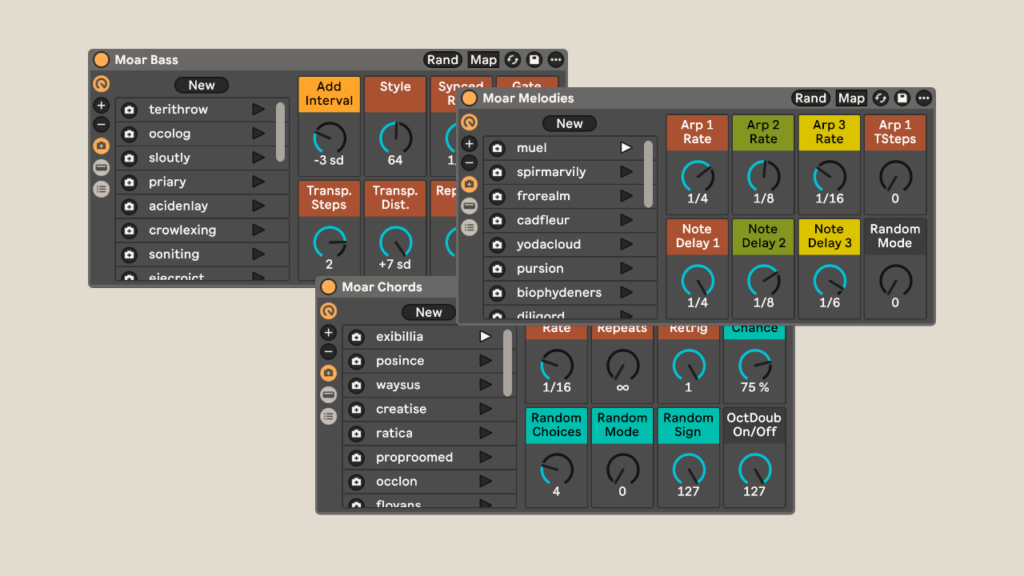
The zip-file contains six adg-files, which are MIDI effect racks and can simply be dragged into a MIDI track or the User Library in Live. The default in the User Library is Presets > MIDI Effects > MIDI Effect Rack.
IMPORTANT: If the button does not open an overlay when clicked, right-click it and select ‘Open Link…’ to access the download.

I would be grateful for a small donation if you are able to give it as a way of saying thanks. Otherwise just add a zero to the price field. If you’d like to donate using PayPal, you can do so above. Thank you very much!
Questions or suggestions? Please simply leave me a comment below.
Check out the other free Sonic Bloom Live Packs.













2 responses
Hi,
I have just gave a 3.44 donation but it will not let me download the SB ReGenerators 3,
Thanks John
Thanks for the donation, John. Do a right-click on the left button. This should work.