Ableton Push Video Tutorials
Now that the first units of Push are shipping Ableton have released a new video tutorial series called ‘Learn Push’. So far there are 6 videos explaining how to use Push in the studio. A lot of them can also

Now that the first units of Push are shipping Ableton have released a new video tutorial series called ‘Learn Push’. So far there are 6 videos explaining how to use Push in the studio. A lot of them can also

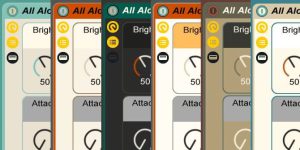
Here are 6 skins for Ableton Live that I’ve created for you to download for free. As you can see on the image below, there are some dark ones, suitable for live performances, as well as lighter ones. Enjoy!

K-Devices have released their newest Max for Live device. It’s called Shaper, it’s great for audio destruction, it’s for Live 9 only and it’s free until the end of March.

This week’s ‘Ableton Live Insider Tip’ is a helpful one when it comes to getting a faster workflow either when quitting Live or switching between Live Sets. It’s simple, but not everyone knows about it. So here is the video:

Cycling ’74 has begun a new series of video tutorials. This time, the focus is on how Max for Live devices included in the Live 9 Suite can be used. The first two videos deal with the Mono Sequencer.

I’m always on the lookout for interesting new Max for Live devices. Plus I like things that improve your workflow so nothing gets in the way when you’re feeling inspired. MIDI Clip Looper is a M4L device that allows you

24 free Scale MIDI effect presets for all major and minor keys. Perfect for staying in tune without music theory in Ableton Live 8 and up.

Today’s post is number 100. Woohoo! Let’s celebrate it with an exclusive interview with Christian Kleine, Max for Live developer at Ableton and creator of the DrumSynth. His Max for Live device already got a lot of praise on the

Ableton Live Insider Tip: enable automatic track arming with an Options.txt command. Works in Live 9+. Perfect for arming tracks on the fly.

If you would like to have a monome, but only have a Launchpad, you can use the Max for Live device Monomeemu instead.

From exotic instruments and soundscapes to weird Operator patches and strange sounds, tight kicks and glitchy blips, here are some of the best free Ableton Live Packs and Presets collected for you.

Ableton’s latest video features the Convolution Reverb that comes with Live 9 Suite. It shows not only how you can use the presets, but also create your own spaces. Convolution reverb is a process used to digitally simulate the reverberation
Search
Stay in Touch
Latest Releases
Sign up to the monthly newsletter for the latest on the Sonic Bloom blog as well as regular discounts.
Features 28 powerful mid/side audio effect racks for Ableton Live 12.2, each with 10 variations. From precise control in mixing to instantly giving more interest to basic sounds.