Bounce in Place & Follow Actions for Scenes with these Max for Live Devices
No matter how many feature wishes Ableton will grant us in updates und upgrades, there will always be things we wish we could also do. And this is exactly, where Max for Live or better developers come in to play.
Ableton Live Quick Tips: Show Modulation
In this tutorial in the Ableton Live Quick Tips video series, I’m showing you how you can access the mixer modulation envelopes – volume, panning and the send modulations. This one should be particularly interesting for anyone who works quite
Oblique Strategies No. 75
Start backwards.
Prompts or constraints to foster creativity.

Color by Max for Cats Out Now: The Sound of Vintage Machines at your Fingertips
By now, most Sonic Bloom readers are probably aware that Christian Kleine aka Max for Cats has a soft spot for old analogue gear. Of course, this goes for all the flaws and shortcomings of these vintage machines as well.
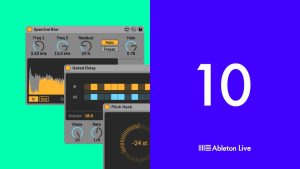
Creative Extensions: 8 Inventive Free M4L Devices by Ableton
Creative Extensions includes 8 tools for new sound design features in Live 10 Suite, created with Amazing Noises.

Resampling in Ableton Live – Use Cases for Inspiration
After I’d published my article about the different resampling methods in Ableton Live, I was asked over and over if I could share some examples of how I use resampling creatively in my own music. It took me quite some
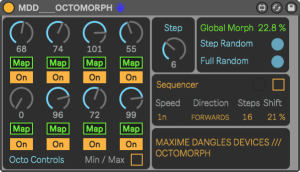
3 Free Max for Live Devices for Pitch Drops, Morphing Presets and Crazy LFOs
This time I selected three free Max for Live devices from the latest releases on maxforlive.com that can be very useful for live performances. Of course, they may also come in handy in your music productions, but in my opinion, they
Ableton Live Quick Tips: Arrow Keys to Toggle
Now that I’ve updated all relevant tutorials to Live 10, I’m back with the Ableton Live Quick Tips series. This time, I’ve got a little tip that can be useful for your workflow, but isn’t documented in the Live manual.

Oblique Strategies No. 74
No judgement.
Prompts or constraints to foster creativity.