
In a live performance situation you might want to see the play position of your session view clips to know when to start the next scene or clip. The track status in Live might be too small to use as a visual cue though. “Clip Loop Monitor” is a Max for Live device that shows the clips’ current playing position of 7 chosen tracks. Either in the device or in a floating window making it easy to see their clips’ progress even from a short distance away.
It only shows visual feedback for session view clips, not for the ones playing in the arrangement view, mind you. “Clip Loop Monitor” requires Live 9 and Max 6.1.
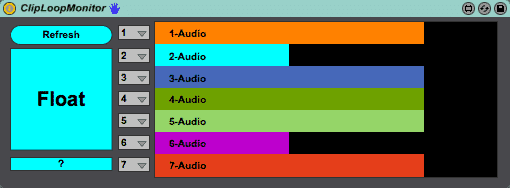
How it works:
- Add the device to any MIDI track.
- Select which tracks you want to monitor. If you don’t it will default to tracks 1 – 7.
- Hit Float if you don’t already see the floating window.
- Play some clips and see it shows you their status. Enjoy.
This way for heaps more Max for Live devices & tips.













2 responses
Hi!
I’m looking for a simple Max for Live device, that would show in a floating window when any session clips are being recorded (or recording is waiting to be launched by the global quantisation setting). Thanks for the help!
Kind regards,
Aapo Halonen
I don’t think I’ve come across something like this although it should be possible. Maybe try Ableton Drummer as he’s known to make devices in that vein.