6 Free Skins for Ableton Live 9 (#2)
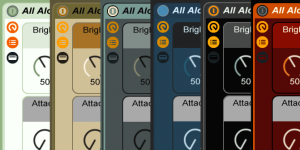
I’ve created 6 new skins for Ableton Live that you can download for free. They work well with Live 9 and also previous versions. This set of skins adds more dashes of colour than the last one, but without being

I’ve created 6 new skins for Ableton Live that you can download for free. They work well with Live 9 and also previous versions. This set of skins adds more dashes of colour than the last one, but without being

Part 6 of the series “Ableton Live Insider Tips” for the last time deals with commands that you can add to the Options.txt file. This time it’s all about ReWire:

Today is International Women’s Day and so this post will be about women making electronic music. Kind of…

Whitebox Synth Makers have made quite an impressive collection of free Max 4 Live Plug-ins. There’s a lot of synths, a sample player, an ambient and percussive instruments.

To celebrate the release of Live 9, I’ve created a Live Pack for you. Aptly named ‘On the Rocks’, it contains three instrument racks with field recordings, the sound of a glass harp (bass, synth) and the clink of ice

1433 days after Live 8 saw the light of day, Ableton finally releases version 9 today. That’s a lot of days for software. Now that the wait is over, the question is: Will you upgrade right away, wait a while

Part 5 of the series “Ableton Live Insider Tips” explains what the command NoAutoArming does, that you can add to the Options.txt file and what it might be useful for.

The Rhodesque Live Pack contains 5 macro mapped instrument racks that are all using the same note played on a Rhodes. I created them to show you how many different sounds can be achieved by tweaking the parameter of a

If you use multiple VST plugins and effects in Ableton Live, the CPU usage can quickly skyrocket. With the freeze function you can reduce the amount of real-time processing and thus increase the number of plugins and effects that you

Suite 9 will come not only with Max for Live, but also with quite a lot of fantastic new Max for Live tools. To make things more thrilling, there’s a new video by Ableton showing those devices in action.

Part 4 of the series “Ableton Live Insider Tips” explains how recorded automation curves can be changed in Live with the command ThinningAggressiveness in the Options.txt file.

TouchOSC is a modular user interface for OSC and MIDI control for iPhone, iPod Touch and iPad. It’s been my favourite app/MIDI controller in the last years because it is so versatile.*
Search
Stay in Touch
Latest Releases
Sign up to the monthly newsletter for the latest on the Sonic Bloom blog as well as regular discounts.
Features 28 powerful mid/side audio effect racks for Ableton Live 12.2, each with 10 variations. From precise control in mixing to instantly giving more interest to basic sounds.